Israel's attack on UN School in Gaza during the Israeli's terror war on Gaza

TvQuran
Showing posts with label Tools and Utilities. Show all posts

Tuesday, December 30, 2008

Recuva v1.21.373


Recuva (pronounced "recover") is a freeware Windows utility to restore files that have been accidentally deleted from your computer. This includes files emptied from the Recycle bin as well as images and other files that have been deleted by user error from digital camera memory cards or MP3 players. It will even bring back files that have been deleted by bugs, crashes and viruses!

But as with any deleted file that you want to bring back, the older it is, the harder it will be to bring back.   Plus if you are able to bring it back, the older it is, the more corrupted the file will be.    So if you want to bring a deleted file back, you need to do it as fast as possible.   The more you delay, the less chance there is of recovering it.


Size: 2284 KB
Download from here.

Thursday, December 25, 2008

Defraggler 1.05.111


From everyone here at Piriform, the company that brought you CCleaner and Recuva... we now bring you a file defragmentation tool... Defraggler!

It differs from other defrag tools on the market, by enabling you to quickly and simply defrag the files you want to, without having to process the whole drive. Simply run it, select the file and defragment in seconds. No more struggling with the Windows defragmentation tool!

 Features of Defraggler 

  • Defrag Individual Files
  • Compact and Portable
  • Vista Support
  • Locate Files on the Drive
  • Freeware
  • And remember like all Piriform products, Defraggler is completely free for both corporate and individual use.

    Size: 701 KB
    Download from here.

    Saturday, December 20, 2008

    TrueCrypt 6.1a

    Free open-source disk encryption software for Windows Vista/XP, Mac OS X, and Linux.

    TrueCrypt is a software system for establishing and maintaining an on-the-fly-encrypted drive. On-the-fly encryption means that data are automatically encrypted or decrypted right before they are loaded or saved, without any user intervention. No data stored on an encrypted volume can be read (decrypted) without using the correct password or correct encryption key. Until decrypted, a TrueCrypt volume appears to be nothing more than a series of random numbers. The entire file system is encrypted (i.e., file names, folder names, contents of every file, and free space).

    This software is highly recommended for securing data on laptops.


    Size: 3 MB
    Download from here.

    Thursday, December 18, 2008

    VMware Player 2.5.1

    VMware Player lets you evaluate new or pre-release software contained in virtual machines, without any installation or configuration hassles. You can also share existing virtual machines with colleagues or friends just use VMware Player to run any virtual machine.

    A virtual machine is a computer defined in software. It's like running a PC on your PC. VMware Player runs any virtual machine created by VMware Workstation, GSX Server or ESX Server. VMware Player also supports Microsoft virtual machines and Symantec LiveState Recovery disk formats.

    • Copy and paste. Copy text and files between the virtual machine and the host PC.
    • Drag and drop. Drag and drop files between a Windows host PC and a Windows virtual machine.
    • Integrated Google Search. VMware Player includes Google search capabilities, fully integrated for conveniently searching the web without launching a browser.

    Size: 48.73 MB

    Download from here.

    Wednesday, December 17, 2008

    7-Zip 4.62 - Update

    7-Zip is a file archiver with a high compression ratio.


    A light and very fast program for compressing and de-compressing files. It is far better than Winzip & Winrar.


    The main features of 7-Zip:

    • High compression ratio in new 7z format with LZMA compression
    • Supported formats:
      • Packing / unpacking: 7z, ZIP, GZIP, BZIP2 and TAR
      • Unpacking only: RAR, CAB, ISO, ARJ, LZH, CHM, MSI, WIM, Z, CPIO, RPM, DEB and NSIS
    • For ZIP and GZIP formats, 7-Zip provides a compression ratio that is 2-10 % better than the ratio provided by PKZip and WinZip
    • Self-extracting capability for 7z format
    • Integration with Windows Shell
    • Powerful File Manager
    • Plugin for FAR Manager
    • Localizations for 69 languages
    7-Zip works in Windows 98/ME/NT/2000/XP/Vista. There is a port of the command line version to Linux/Unix.

    Size: 912 KB
    Download from here.

    TvQuran

    Sunday, December 14, 2008

    FileMenu Tools 5.4.1

    FileMenu Tools allows you to customise the context menu of Windows Explorer. And it lets you:

    • Add some built-in utilities that perform operations on files and folders.
    • Add customised commands which run external applications, copy/move to a specific folder or delete specific file types.
    • Configure the "Send to..." submenu.
    • Enable/disable commands which are added by other applications to the context menu.


    Do more with features like -

    • Configure built in commands or add customized commands according to the file types you right click on.
    • Configure the ‘Send to Menu’ within the FileMenu program.
    • A very handy advanced renamer lets you batch rename all files in a folder.
    • Synchronize two folders from within Windows Explorer.
    • Split-join files and also compresses the parts.
    • Find or replace a text for all the files that a selected folder contains.
    • Delete only files of a specific type. For example, delete only the ‘.log’ files from the temporary folder.
    • Mark locked files (files which are being used by other programs) for deletion with the next system boot.
    • Securely shred your files and make them unrecoverable.
    • Get a view of folder size through a pie chart.
    • Send selected contents as email attachments.
    • Add separators and demarcate your right click shortcuts.

    These are just some of the utilities packaged inside FileMenu Tools. The greatest advantage beyond the ease of configuration is that the software bundles a lot of disparate utilities in an accessible collection. At an installed size of 6.4 MB and a freeware it’s click worthy.


    Size: 5.2 MB
    Download from here.


    TvQuran

    Sunday, December 7, 2008

    Moo0 RightClicker 1.26 (Free)

    Enhance Your Context Menu

    Moo0 RightClicker is a set of enhancements on the context menu (right click menu) of Windows Explorer. It adds many useful functonalities like duplicating current explorer window, open/move to/copy to bookmarked folders, hiding default context menus, and so forth.


    The program opens with a notice mentioning a bug in Win XP which causes CPU utilization to spike to 100% temporarily (though, I did not catch any…) under certain usage conditions. It gives the option to turn off some ‘Effects’ in Display Properties. The functions are simple to understand. The free version gives two interface options - Simple and Basic.

    Here’s a feature list -

    • Copy and move files and folders to bookmarked or standard system folders. Bookmarking often used folders is a nice touch.
    • Intelligent copying - using the name, path, or contents of an actual file.
    • Sort folder contents by numerous attributes.
    • Create a duplicate window. (Access it from the File menu of a folder)
    • Preview images.
    • Arrange neatly with quick-collapsing menus.
    • Delete items permanently bypassing the recycle bin.

    Moo0 doesn’t remove any of your earlier customizations but lets you add some more. So it integrates the earlier shell entries you might have made. Un-installation is also safe. The only thing I wish is that could have given me a bit more choice against its default lime green color.


    Size: 4.22 MB
    Download from here.

    Thursday, December 4, 2008

    Folder Guide 1.2

    Folder Guide is a free handy utility that provides fast access to your frequently used and favorite folders. It can operate as the part of your context menu in your Windows Explorer.

    After quick install it will appear in context menus of Windows Explorer and Open/Save dialogs as "Folder Guide" item. With Folder Guide, you no longer need dozens of mouse clicks to navigate to your desired folder. Now reach your favorite folders in just 2 mouse clicks. Select from right click menu "Folder Guide" then click on your desired folder. Folder Guide runs automatically as part of the Windows Explorer context menu, so you will never need to start the program otherwise you want to edit the list of folders. It also works from the desktop, the Start button.

    It does NOT contain any Spyware, Adware or Viruses.

    Size: 768 KB
    Download from here.

    Monday, December 1, 2008

    Launcher 1.6.0

    Program launcher to manage shortcuts and launch applications.

    Launcher is an easy-to-use file and application shortcut manager that can launch all kinds of files and programs.

    Drag-and-drop operations are supported when editing items shown in the Launcher 
    open and launch menu in system tray. 

    It is possible to create shortcuts by 
    dragging files from e.g. Windows Desktop and Windows File Explorer followed by dropping them into the Launcher Manage Items configuration window for menus and shortcuts.

    One can create an unlimited amount of user defined sub-folders and item shortcuts to documents and applications. 
    Launcher resides in the system tray per default to allow for quick launch of all favourite programs and often used files.

    Launcher also supports various user interface options, e.g. customizable program font setup including type and size. 

    Size: 1.03 MB

    Download from here.

    Saturday, November 29, 2008

    WebShot

    WebShot allows you to take screenshots of web pages and save them as full sized images or thumbnails. Screenshots images can be output in the JPG, GIF, PNG, or BMP formats.

    Features

    • Automatic determination of page width and height that captures the whole page accurately. Frame dimensions are determined and calculated on pages that have them.
    • Browser size specification allows you to capture the whole page or part of it
    • Image thumbnailing reduces the final capture image easily
    • Timeouts allow you to wait for activex controls to load before capturing
    • Image encoding to JPG, GIF, PNG, and BMP with image quality control to save on disk space
    • CSV output allows you to easily parse the results of a screenshot capture operation
    • CSV output of page title, meta keywords, and description helps you parse the most important information from a page
    • Use within your own applications using the dll and example C source code
    • Blocks most popups (javascript popups, script dialogs, injected via wmp popups, etc)
    • Multiple threads allow you to quickly capture more screenshots without running multiple processes
    • Custom user agents allow you to view a web page that might be served to other browsers
    • Easily delete all of Internet Explorer's cache, so your hard drive doesn't get full
    • Global bitmap file mapping object, reduces memory footprint for multiple threads per instance
    • Configure custom HTTP post strings and HTTP authentication credentials
    • Configurable message box popup automation to automatically deal with message boxes that Internet Explorer might throw
    • Higher quality color quantized gif images produce better screenshots with less disk space
    • PHP COM scriptability
    • Actively maintained and developed

    Size: 1 MB

    Download from here.

    Friday, November 28, 2008

    Translate.Net V 0.1.3232.3509 - Update

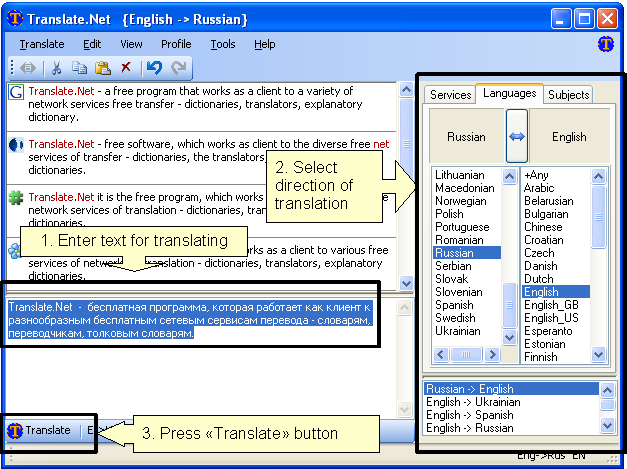
    The Translate.Net will help you to translate words and phrases to and from numerous languages in simple way.

    It is free, open-source software work as client to most popular translating services available online (translators, monolingual and bilingual dictionaries). 

    Already supported 26 sites with language services, 40 services, 39 languages, 1367 translations directions.

    User interface enhanced with many smart improvements:

    • history of used language pairs which sorted by last use time
    • input locale catching - when user change input locale, the latest language pair from history is selected. When user select language pairs - input locale changed accordingly
    • system hotkeys (Ctrl+C+C and\or Ctrl+Ins+Ins) allow to activate Translate.Net and easily perform translation from any software
    • support of user profiles (user defined sets of services)
    NB: Microsoft .NET Framework Version 2.0 & connection to the internet are needed.

    Size: 924 KB
    Download from here.

    Monday, November 24, 2008

    LingoPad V2.6 (Multilingual Dictionary)

    LingoPad is a free offline dictionary for Windows.

    LingoPad contains a German ↔ English dictionary; other dictionaries (Spanish, Italian, French, Japanese, Chinese, Turkish, Kurdish, Norwegian or Arabic) can be downloaded as well. You can also import your own wordlists and use them parallel to the existing dictionaries. For each dictionary, a user dictionary can be defined to include additional wordlists.

    The program is freeware and can be downloaded and used free of charge.


    Size: 20 MB

    Download from here.

    Saturday, November 22, 2008

    Q-Dir V3.32

    Q-Dir makes your files and folder easy to manage.
    Fast and easy access, with an amazing Quadro-View technique. 
    You don't have to renounce the usual, Drag and Drop, all Views, and other functions of your system.

    One can save many hand moves and also time! 

    Q-Dir does not have to be installed and can be executed easily from the desktop.
    Rename Q-Dir_Installer.exe to Q-Dir.exe and GO.

    It's a small famous utility for Windows PC-s and also an USB-stick friend :).


    ::Some Features::

    Favorites:
    Quick access to most often used folders. 
    Drag&Drop:
    Move files by dragging in Q-views, and other programs such as MS Explorer. 
    Clipboard:
    Copy/ Paste between the Q-Dir directory views, and other programs such as MS Explorer. 
    Folder-Type:
    ZIP-, FTP-,cabinet-,network-, system - folders, shortcuts ... 
    Views:
    Large icons, tiles, list, detail, thumbnail (Vista: extra large symbols) . 
    Export:
    to XLS, CSV, TXT, HTML. 
    Popup Menus:
    Desktop, My Computer. 
    Screen magnifier:
    anything on the screen can be enlarged. 
    Color Filter:
    Different colors for different item types (e.g. *.log;*.txt). 
    Highlight-Filter:
    Effective way for fast items highlighting. 
    File-Filter:
    Allows for quick and easy filtering of the items. 
    Columns: -Quick-Link's:
    All columns support, and save function .    -For fast folder access. 
    Folder-Select:
    Fast & flexible folder selection address-bar/ desktop menu/ my-computer menu/... 
    Multi-INI: -Tree-View:
    Several INI files for Q-Dir.    -Simple and quadruple. 
    Preview:
    Allows a quick preview. 
    Portable:
    from 2.77 is Q-Dir portable. 


    Size: 191 KB

    Download from here.

    Friday, November 21, 2008

    CDBurnerXP Pro 4.2.3 - Update

    CDBurnerXP is a free application to burn CDs and DVDs, including Blu-Ray and HD-DVDs. It also includes the feature to burn and create ISOs, as well as a multilanguage interface. Everyone, even companies, can use it for free.


    Key Features

    * burn all kinds of discs
    * audio-CDs with or without gaps between tracks
    * burn and create ISO files
    * data verification after burning process
    * create bootable discs
    * multi-language interface
    * bin/nrg → ISO converter, simple cover printing and much more!
    * Operating Systems: Windows 2000/XP/2003 Server/Vista


    Size: 3.04 MB
    Download from here.

    Thursday, November 20, 2008

    Smart Defrag V 1.02

    .. this freeware will give you a complete diagnosis of your current hard drives, then defragment and speed up disk performance in minutes.

    You’ll also notice “express” and “comprehensive” defrag options.  If you choose “express” it will defrag your drives in much less time but if you choose comprehensive, it will do a great job.

    It’s extremely easy to use and with its “install and forget” feature which works continuously, automatically and quietly in the background on your PC, it’s a must have

    Size: 2.37 MB
    Download from here.

    Monday, November 17, 2008

    Burn4free v4.6

    FREE DVD COPY,CD COPY,DVD BURNER

    Top features:

    1. Burn4Free burn data (CD and DVD) and audio from different files types (WAV, FLAC, WavPack, WMA, M3U (mp3 winamp compilation) , MP3, MP2, MP1 OGG and CDA (normal cd audio tracks))
    2. Low cost burning : you can burn and dvd copy- backup data - cd with only 2 clicks
    3. CD-R/CD-RW/DVD-R/DVD+R/DVD-RW/DVD+RW/DVD-RAM drives (SCSI - IDE/EIDE - USB) are supported
    4. Multi languages: many languages are available, choose your favorite
    5. Print Compilation, select layout, colors and items to print
    6. 4 way to burn your CD/DVD: you can choose the way you prefer to burn a CD/DVD (fly window, right click from explorer, internal add window, derag & drop
    7. Burn and save .ISO files
    8. DVD dual layer support (check Compatibility menu)
    9. Print Compilation
    10. Burn MP3 compilation
    11. Free online upgrades
    12. Easy Interface
    13. Easy to use ex: you can store all your movies
    14. 1900 + COMPATIBLE RECORDERS

    Size: 4.2 MB

    Download from here.

    Friday, November 14, 2008

    FreeCommander 2008.06c

    FreeCommander is an easy-to-use alternative to the standard windows file manager. The program helps you with daily work in Windows. Here you can find all the necessary functions to manage your data stock. You can take FreeCommander anywhere - just copy the installation directory on a CD or USB-Stick - and you can even work with this program on a foreign computer.

    Main features in FreeCommander:

    • Dual-panel technology - horizontal and vertical
    • Tabbed interface
    • Built in file viewer to view files in hex, binary, text or image format
    • File viewer inside archives too
    • Built in archive handling: ZIP (read, write), CAB (read, write), RAR (read)
    • Nested archive handling
    • Built in FTP client
    • Easy access to system folders, control panel, desktop and start menu
    • Copy, move, delete, rename files and folders
    • Multi rename tool
    • Wipe files
    • Create and verify MD5 checksums
    • File splitting
    • Calculation of folder size
    • Folder comparison / synchronization
    • Modification of file date and attributes
    • Folder / program favorites
    • File searching (inside archive too)
    • File filters for display
    • User defined columns for detailed view
    • DOS command line
    • Multiple language support


    Size: 2.29 MB
    Download from here.

    Tuesday, November 11, 2008

    Auslogics Disk Defrag V1.5.19.330

    Auslogics is one of the best disk defragmentation applications on the web. It includes numerous features not usually available on many similar applications, and is extremely fast

    Disk fragmentation leads to system slowdowns, PC crashes, slow startups and shutdowns. Auslogics Disk Defrag is designed for fast optimization of modern hard disks.

    Defragmenting your hard-drive is an essential part of keeping your computer running smoothly but the Windows defrag tool makes the job last for hours (I have to run it overnight when I am in bed) and you can’t do anything else with your computer while it is running.

    Auslogics Disk Defrag was designed to remedy system sluggishness and crashes caused by disk fragmentation. It is optimized to work with today's modern hard disks. Auslogics Disk Defrag is extremely simple to use, does not require any analysis phase and is faster than most of the other disk defragmentation software. It will help you get the maximum performance out of your expensive hardware investments. And, what’s most important, it's absolutely free.

    Size: 1.68 MB

    Sunday, November 9, 2008

    Undelete Plus V2.98

    Undelete Plus is a quick and effective way to restore accidentally deleted files. It can also recover files that have been emptied from the Recycle Bin, permanently deleted files within Windows using the Shift + Delete, and files that have been deleted from within a Command
    Prompt.
    The best feature of Undelete Plus, besides the whole undeleting part, is its ability to filter your deleted files.  This makes the searching process much less painful.

    You can filter files by type, folder and drive.  This provides a great start, but even if I filter it down to images, I still have a couple hundred images to choose from.  Undelete Plus allows you to also sort the files by filename, path, status, size, date created and date modified.  After a quick filter and sort, you should be able to quickly find the file you want to restore.


    For a limited time Undelete Plus is FREE Software for general non-commercial use. It contains absolutely NO ADWARE, NO SPYWARE, NO REGISTRATION, NO POPUPS, NO MALWARE or other unwanted software.

    Undelete Plus allows the following tasks to be performed:
    - Recovery of deleted files from NTFS/NTFS5, FAT12/FAT16/FAT32 volumes.
    - Restoring deleted files on Windows 2000, Windows XP, Windows 98, Windows ME, Windows NT, Windows 2003, Windows Vista.


    Size: 2.98 MB

    Friday, November 7, 2008

    CCleaner 2.13.720 - Update

    CCleaner is a freeware system optimization and privacy tool.

    It is fast and very useful for beginners and power users.


    It removes unused files from your system - allowing Windows to run faster and freeing up valuable hard disk space. It also cleans traces of your online activities such as your Internet history. But the best part is that it's fast (normally taking less than a second to run) and contains NO Spyware or Adware!

    CCleaner Cleans the following:
    • Internet Explorer Cache, History, Cookies, Index.dat.
    • Recycle Bin, Temporary files and Log files.
    • Recently opened URLs and files.
    • Third-party application temp files and recent file lists (MRUs).
      Including: Firefox, Opera, Media Player, eMule, Kazaa, Google Toolbar, Netscape, Office XP, Nero, Adobe Acrobat, WinRAR, WinAce, WinZip and more...
    • Advanced Registry scanner and cleaner to remove unused and old entries.
      Including File Extensions, ActiveX Controls, ClassIDs, ProgIDs, Uninstallers, Shared DLLs, Fonts, Help Files, Application Paths, Icons, Invalid Shortcuts and more... Backup for registry clean.
    • Windows Startup tool.
    CCleaner has four main sections which can be selected using the 4 icons in the left-hand navigation panel:
    1. Cleaner: This is the main feature of the program, which will allow you to optimize your system, by removing unused and temporary files.
    2. Registry: This is a more advanced feature which analyses your computers registry and fixes any problems and inconsistencies that exist.
    3. Tools: This section allows you manage installed programs and applications.
    4. Options: The Options section handles a wide array of preferences for how CCleaner runs.

    Size: 2.88 MB

    Download from here.